First a few words of introduction on what is XRebel and what can we use it for.
XRebel, as it’s tagline says, is a “lightweight java profiler”.
What can it do for you? It can plug into your Java application and will give you insights on how and what your application is doing in the following areas:
Some initial assumptions regarding your setup:
To start working with XRebel we need to add one line to JAVA_OPTS variable (%LIFERAY_HOME%tomcat-6.0.29binsetenv.bat/%LIFERAY_HOME%tomcat-6.0.29binsetenv.sh):
“-javaagent:”%XREBEL_PATH%xrebel.jar”
After starting Liferay we have a message in tomcat console log from XRebel:
2015-05-02 14:22:03 XRebel: Started XRebel for application: http://localhost:8080/
2015-05-02 14:22:03 XRebel: XRebel UI is available at http://localhost:8080/xrebel
If we run our application on http://localhost:8080/ it will now include XRebel GUI. It may not work for all requests, especially with RESTful applications. To make it work we need to open it in a new browser tab http://localhost:8080/xrebel, where you will find a standalone UI for XRebel. There we can see all the requests targeted at application deployed in the ROOT context.
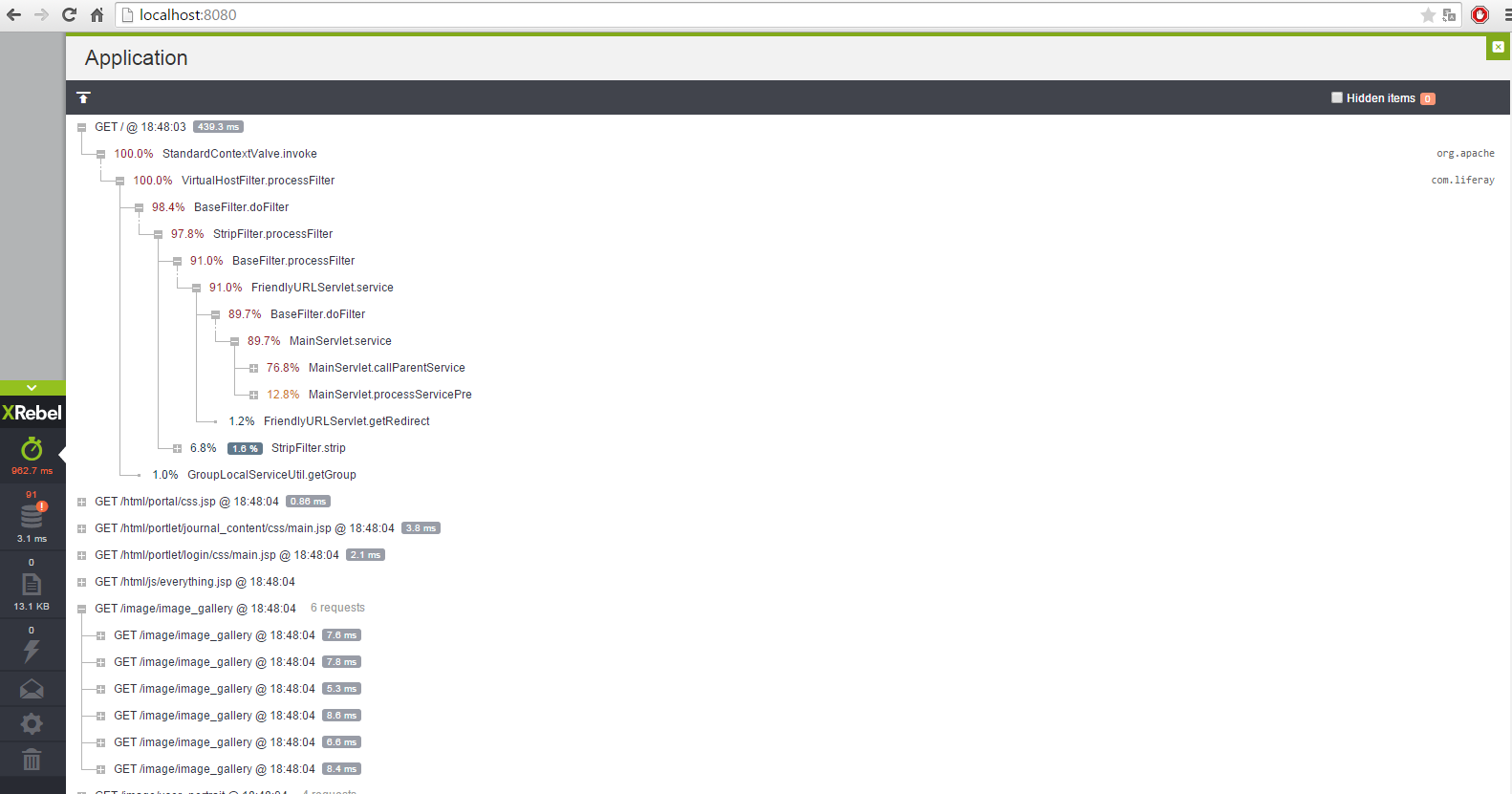
After we login into Liferay (user: test@liferay.com) we can see all HTTP requests with timings and percentage statistics for methods called the on server side.
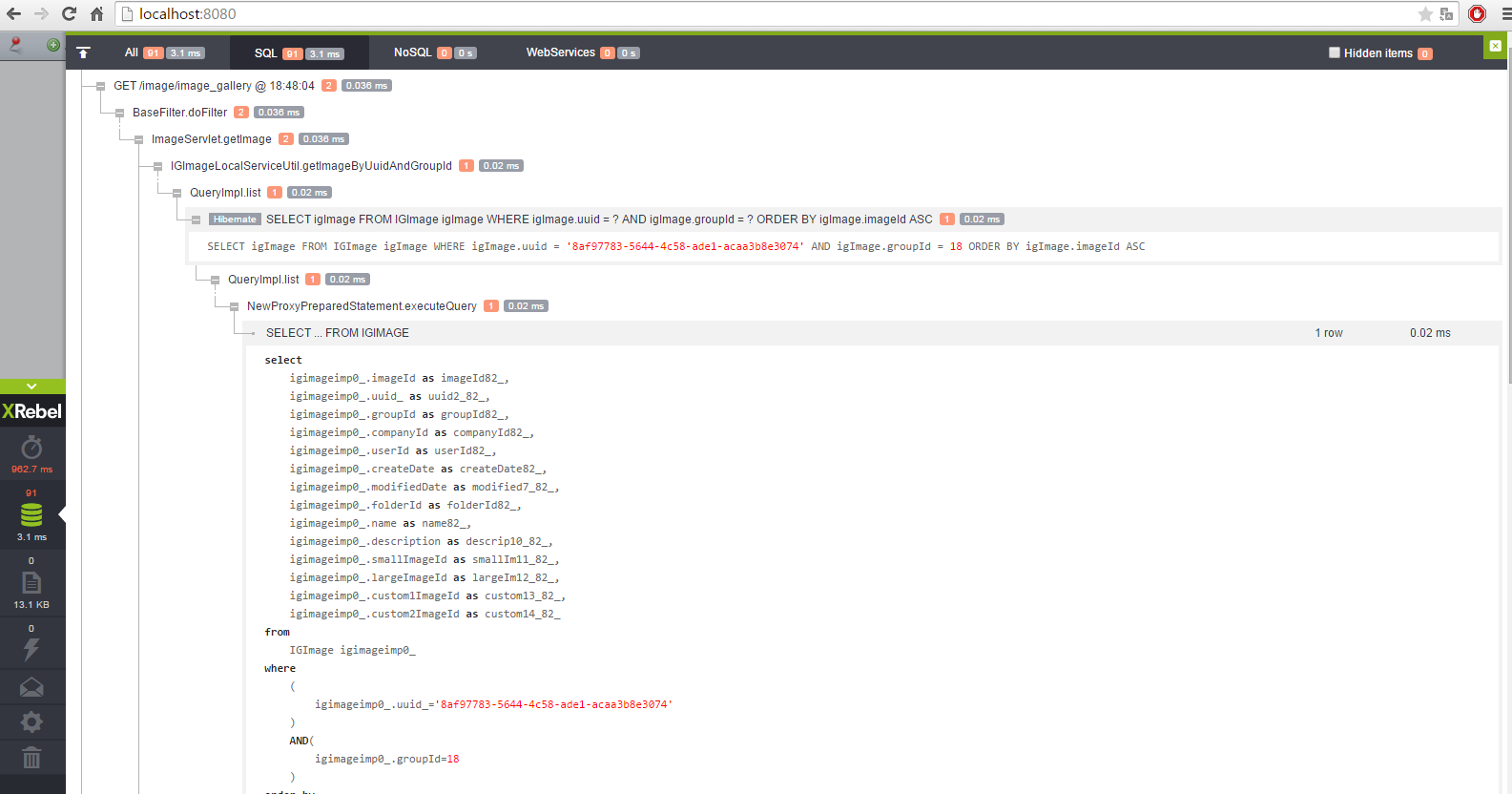
In my opinion the most valuable thing in XRebel is the Query tab. In this example we can see SQL query with filled parameters and this query we can just copy and paste to our favourite SQL IDE and execute it or check execution plan.
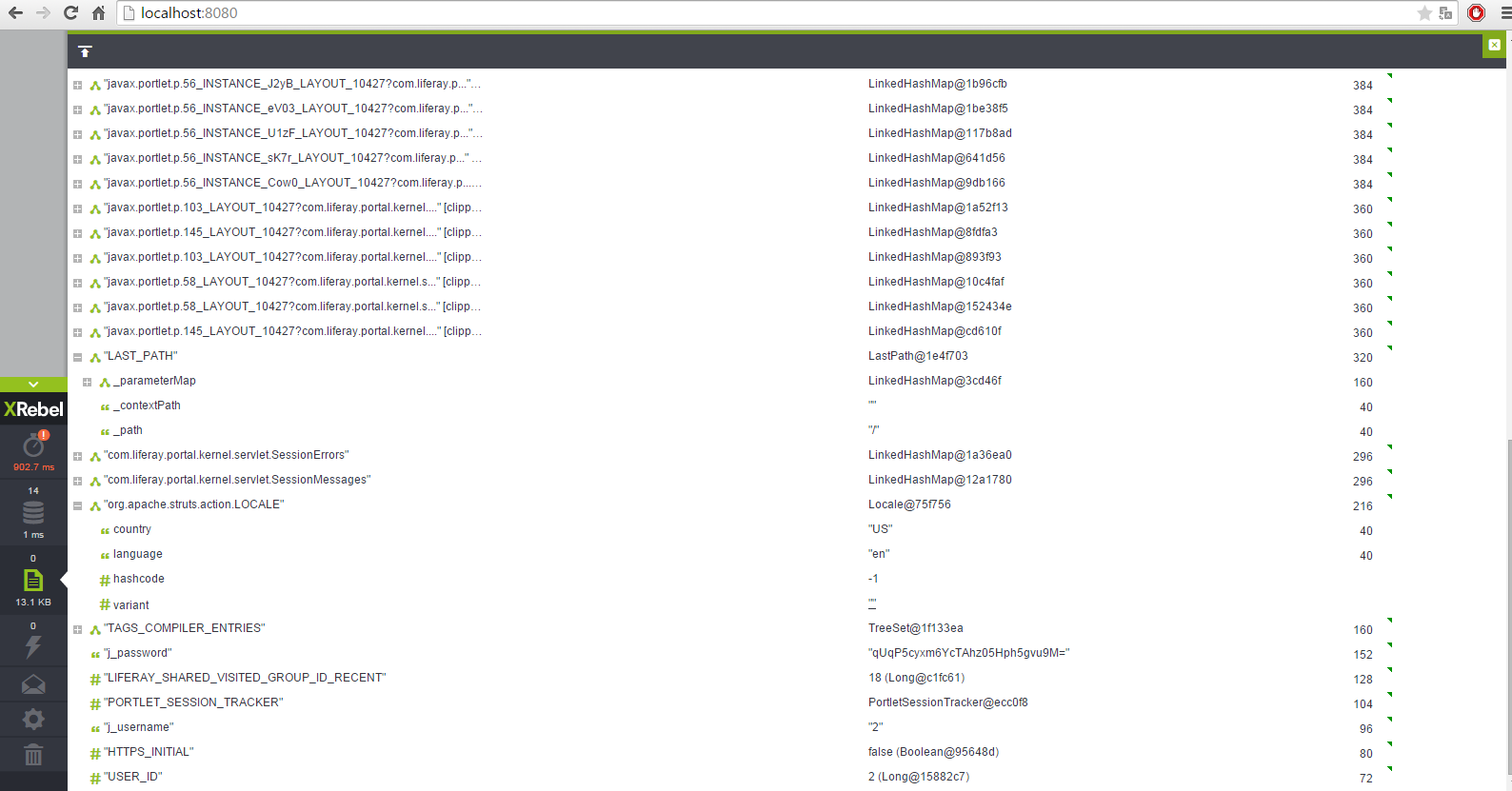
We can see all objects stored in session just like on the screen:
To start testing we create xrebel-test portlet to see how XRebel can help us in developing with Liferay.
We create one servlet which returns a JSON-formatted currencies list. We are using our library to download currencies from NBP (National Bank of Poland). We want to download currencies and log some event data to the database.
Our servlet:
|
1
2
3
4
5
6
7
8
9
10
11
12
13
14
15
16
17
18
19
20
21
22
23
24
|
static Gson gson = new Gson();
static SimpleDateFormat sdf = new SimpleDateFormat(“yyyy-MM-dd”);
static {
GsonBuilder gsonBuilder = new GsonBuilder();
gson = gsonBuilder.create();
}
@Override
protected void doGet(HttpServletRequest req, HttpServletResponse resp) throws ServletException, IOException {
CurrencyDownloader currencyDownloader = new CurrencyDownloader();
try {
AverageCurrencyTable averageCurrencyTable = currencyDownloader.getCurrencyTableByDate(CurrencyTableType.AVERAGE, sdf.parse(“2015-05-05”));
CurrencyDownloadLog currencyDownloadLog = CurrencyDownloadLogLocalServiceUtil.createCurrencyDownloadLog(CounterLocalServiceUtil.increment(CurrencyDownloadLog.class.getName()));
currencyDownloadLog.setDownloadDate(Calendar.getInstance().getTime());
currencyDownloadLog.setRecordCount(averageCurrencyTable.getRecords().size());
CurrencyDownloadLogLocalServiceUtil.updateCurrencyDownloadLog(currencyDownloadLog);
resp.getWriter().append(gson.toJson(averageCurrencyTable));
resp.getWriter().flush();
resp.getWriter().close();
} catch (Exception e) {
e.printStackTrace();
}
}
|
Our servlet “/xrebel-test/currenciesDownload” returns:
|
1
2
3
4
5
6
7
8
9
10
11
12
13
14
15
16
17
18
19
20
21
22
23
24
25
26
27
28
29
30
31
32
33
34
35
36
37
38
39
40
41
42
43
44
45
46
47
48
49
50
51
52
53
54
55
56
57
58
59
60
61
62
63
64
65
66
67
68
69
70
71
72
73
74
75
76
77
78
79
80
81
82
83
84
85
86
87
88
89
90
91
92
93
94
95
96
97
98
99
100
101
102
103
104
105
106
107
108
109
110
111
112
113
114
115
116
117
118
119
120
121
122
123
124
125
126
127
128
129
130
131
132
133
134
135
136
137
138
139
140
141
142
143
144
145
146
147
148
149
150
151
152
153
154
155
156
157
158
159
160
161
162
163
164
165
166
167
168
169
170
171
172
173
174
175
176
177
178
179
180
181
182
183
184
185
186
187
188
189
190
191
192
193
194
195
196
197
198
199
200
201
202
203
204
205
206
207
208
209
210
211
212
213
214
215
216
217
218
|
{
‘records’:[
{
‘averageRate’:0.1084,
‘currencyName’:‘bat (Tajlandia)’,
‘currencyCode’:‘THB’,
‘conversionRate’:1
},
{
‘averageRate’:3.6205,
‘currencyName’:‘dolar ameryka?ski’,
‘currencyCode’:‘USD’,
‘conversionRate’:1
},
{
‘averageRate’:2.8508,
‘currencyName’:‘dolar australijski’,
‘currencyCode’:‘AUD’,
‘conversionRate’:1
},
{
‘averageRate’:0.467,
‘currencyName’:‘dolar Hongkongu’,
‘currencyCode’:‘HKD’,
‘conversionRate’:1
},
{
‘averageRate’:2.9883,
‘currencyName’:‘dolar kanadyjski’,
‘currencyCode’:‘CAD’,
‘conversionRate’:1
},
{
‘averageRate’:2.7189,
‘currencyName’:‘dolar nowozelandzki’,
‘currencyCode’:‘NZD’,
‘conversionRate’:1
},
{
‘averageRate’:2.7079,
‘currencyName’:‘dolar singapurski’,
‘currencyCode’:‘SGD’,
‘conversionRate’:1
},
{
‘averageRate’:4.0179,
‘currencyName’:‘euro’,
‘currencyCode’:‘EUR’,
‘conversionRate’:1
},
{
‘averageRate’:1.3325,
‘currencyName’:‘forint (W?gry)’,
‘currencyCode’:‘HUF’,
‘conversionRate’:100
},
{
‘averageRate’:3.8619,
‘currencyName’:‘frank szwajcarski’,
‘currencyCode’:‘CHF’,
‘conversionRate’:1
},
{
‘averageRate’:5.4758,
‘currencyName’:‘funt szterling’,
‘currencyCode’:‘GBP’,
‘conversionRate’:1
},
{
‘averageRate’:0.1712,
‘currencyName’:‘hrywna (Ukraina)’,
‘currencyCode’:‘UAH’,
‘conversionRate’:1
},
{
‘averageRate’:3.01,
‘currencyName’:‘jen (Japonia)’,
‘currencyCode’:‘JPY’,
‘conversionRate’:100
},
{
‘averageRate’:0.147,
‘currencyName’:‘korona czeska’,
‘currencyCode’:‘CZK’,
‘conversionRate’:1
},
{
‘averageRate’:0.5383,
‘currencyName’:‘korona du?ska’,
‘currencyCode’:‘DKK’,
‘conversionRate’:1
},
{
‘averageRate’:2.7296,
‘currencyName’:‘korona islandzka’,
‘currencyCode’:‘ISK’,
‘conversionRate’:100
},
{
‘averageRate’:0.4728,
‘currencyName’:‘korona norweska’,
‘currencyCode’:‘NOK’,
‘conversionRate’:1
},
{
‘averageRate’:0.4314,
‘currencyName’:‘korona szwedzka’,
‘currencyCode’:‘SEK’,
‘conversionRate’:1
},
{
‘averageRate’:0.5295,
‘currencyName’:‘kuna (Chorwacja)’,
‘currencyCode’:‘HRK’,
‘conversionRate’:1
},
{
‘averageRate’:0.9081,
‘currencyName’:‘lej rumu?ski’,
‘currencyCode’:‘RON’,
‘conversionRate’:1
},
{
‘averageRate’:2.0544,
‘currencyName’:‘lew (Bu?garia)’,
‘currencyCode’:‘BGN’,
‘conversionRate’:1
},
{
‘averageRate’:1.3361,
‘currencyName’:‘lira turecka’,
‘currencyCode’:‘TRY’,
‘conversionRate’:1
},
{
‘averageRate’:0.9333,
‘currencyName’:‘nowy izraelski szekel’,
‘currencyCode’:‘ILS’,
‘conversionRate’:1
},
{
‘averageRate’:0.589,
‘currencyName’:‘peso chilijskie’,
‘currencyCode’:‘CLP’,
‘conversionRate’:100
},
{
‘averageRate’:0.0811,
‘currencyName’:‘peso filipi?skie’,
‘currencyCode’:‘PHP’,
‘conversionRate’:1
},
{
‘averageRate’:0.2343,
‘currencyName’:‘peso meksyka?skie’,
‘currencyCode’:‘MXN’,
‘conversionRate’:1
},
{
‘averageRate’:0.3007,
‘currencyName’:‘rand (Republika Po?udniowej Afryki)’,
‘currencyCode’:‘ZAR’,
‘conversionRate’:1
},
{
‘averageRate’:1.173,
‘currencyName’:‘real (Brazylia)’,
‘currencyCode’:‘BRL’,
‘conversionRate’:1
},
{
‘averageRate’:1.0017,
‘currencyName’:‘ringgit (Malezja)’,
‘currencyCode’:‘MYR’,
‘conversionRate’:1
},
{
‘averageRate’:0.0705,
‘currencyName’:‘rubel rosyjski’,
‘currencyCode’:‘RUB’,
‘conversionRate’:1
},
{
‘averageRate’:2.7719,
‘currencyName’:‘rupia indonezyjska’,
‘currencyCode’:‘IDR’,
‘conversionRate’:10000
},
{
‘averageRate’:5.704,
‘currencyName’:‘rupia indyjska’,
‘currencyCode’:‘INR’,
‘conversionRate’:100
},
{
‘averageRate’:0.3341,
‘currencyName’:‘won po?udniowokorea?ski’,
‘currencyCode’:‘KRW’,
‘conversionRate’:100
},
{
‘averageRate’:0.5847,
‘currencyName’:‘yuan renminbi (Chiny)’,
‘currencyCode’:‘CNY’,
‘conversionRate’:1
},
{
‘averageRate’:5.0434,
‘currencyName’:‘SDR (MFW)’,
‘currencyCode’:‘XDR’,
‘conversionRate’:1
}
],
‘tableNumber’:‘085/A/NBP/2015″,
‘tableId‘:’15a085″,
‘publicationDate’:‘May 5,
2015 12:00:00 AM’
}
|
In XRebel UI(in context of our portlet) we can see:

As we can see XRebel detected our call to NBP and displayed Request/Response. However there is a little problem because we couldn’t see the whole response body from NBP service. I’ve tried to set the property „xrebel.injection.log_response” to true with hopes the it will help – to no avail. I think it would be great if it was possible to see the whole response body, but as of now it’s not possible – there’s a hard limit of 2048 characters. The reason for this is that the content might be too big to render all at once. In future releases there is supposed to be some solution for this problem.
The most interesting feature for me is SQL query preview. We can see our select query for Counter and CurrencyDownloadLog entities, but we can’t see full data update and insert queries – the statements are there but the parameters bound to specific call are missing.
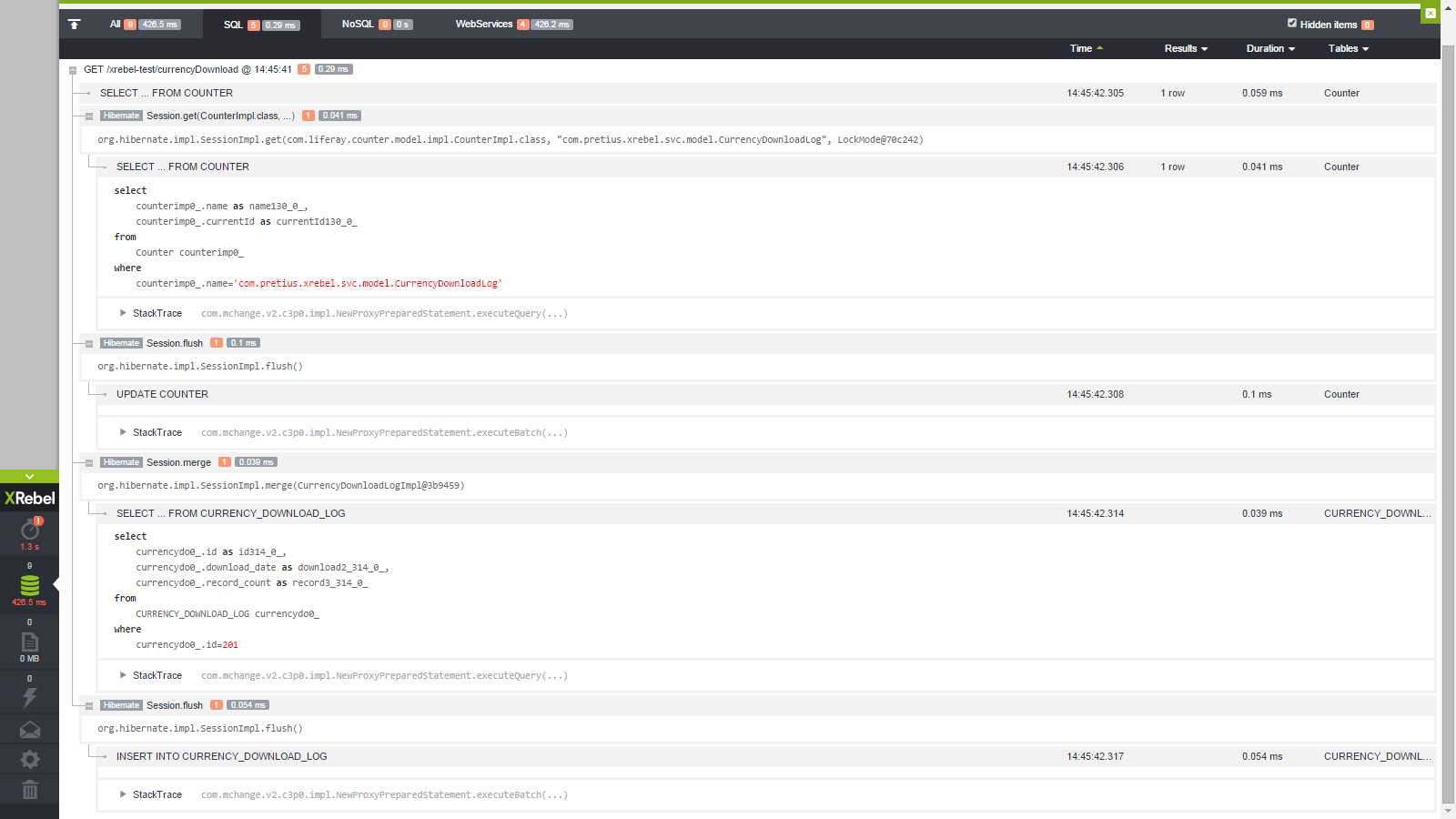
If we set the property „xrebel.injection.log_response” to true we can see the insert and update queries in xrebel.log file, but again, without bound parameters:
|
1
2
3
4
5
6
7
8
9
10
11
12
13
14
15
16
17
18
19
20
21
|
2015–05–07 08:12:22.998 INFO [Module Loader] [90/http–8080–4] Initializing dependent modules in sun.reflect.DelegatingClassLoader@11183d8
2015–05–07 08:12:22.999 WARN [SQL] [102/pool–1–thread–1] Parsing ‘update Counter set currentId=? where name=?’ did not succeed: class com.zeroturnaround.xrebel.bc not an enum
2015–05–07 08:12:22.999 WARN [SQL] [102/pool–1–thread–1] update Counter set currentId=? where name=?
2015–05–07 08:12:22.999 DEBUG [IO] [90/http–8080–4] Registered sql query under Request #40: update Counter set currentId=? where name=?
2015–05–07 08:12:23.005 WARN [SQL] [102/pool–1–thread–1] Parsing ‘select currencydo0_.id as id314_0_, currencydo0_.download_date as download2_314_0_, currencydo0_.record_count as record3_314_0_ from CURRENCY_DOWNL…’ did not succeed: class com.zeroturnaround.xrebel.bc not an enum
2015–05–07 08:12:23.005 WARN [SQL] [102/pool–1–thread–1] select currencydo0_.id as id314_0_, currencydo0_.download_date as download2_314_0_, currencydo0_.record_count as record3_314_0_ from CURRENCY_DOWNLOAD_LOG currencydo0_ where currencydo0_.id=?
2015–05–07 08:12:23.005 DEBUG [IO] [90/http–8080–4] Registered sql query under Request #40: select currencydo0_.id as id314_0_, currencydo0_.download_date as download2_314_0_, currencydo0_.record_count as record3_314_0_ from CURRENCY_DOWNLOAD_LOG currencydo0_ where currencydo0_.id=?
2015–05–07 08:12:23.007 DEBUG [IO] [90/http–8080–4] Registered Hibernate stack info under Request #40: Session.flush
2015–05–07 08:12:23.008 WARN [SQL] [102/pool–1–thread–1] Parsing ‘insert into CURRENCY_DOWNLOAD_LOG (download_date, record_count, id) values (?, ?, ?)’ did not succeed: class com.zeroturnaround.xrebel.bc not an enum
2015–05–07 08:12:23.008 WARN [SQL] [102/pool–1–thread–1] insert into CURRENCY_DOWNLOAD_LOG (download_date, record_count, id) values (?, ?, ?)
2015–05–07 08:12:23.008 DEBUG [IO] [90/http–8080–4] Registered sql query under Request #40: insert into CURRENCY_DOWNLOAD_LOG (download_date, record_count, id) values (?, ?, ?)
|
We’ve sent above issue to XRebel team and they added a fix. I think it will be soon published in new release.
In Windows 7 xrebel.log file is located at %USERPROFILE%.xrebel and it contains logs from all our applications and overrides in next start of application. If we need, we can change this location just adding a VM argument:
-Dxrebel.log.file=/new/path/to/xrebel.log.
What is more, we can add next argument to set debug mode:
-Dxrebel.log=trace
To sum it up, the setup of XRebel with Liferay was pretty easy and in short amount of time I was able to get insights on the stuff my app was doing. XRebel provides a clear and useful UI to get the data needed for application profiling. As of writing of this post there are a few features that I would love to have to in XRebel to make the tool more complete but as of now it’s already very handy and can help with lots of common profiling tasks.