Lovable is an AI tool and, like any AI tool, it requires a certain degree of knowledge and experience in order to use it effectively. It has enormous capabilities, and it can work very quickly.
At the same time, the AI that drives it is usually quite straightforward, tends to make simplistic decisions, and writes code along the path of least resistance. It is not a bad thing, to keep it simple, but it takes an experienced programmer to know the difference. Letting AI make all the decisions without proper guidance will likely eventually lead to having a low quality, slop code underneath the UI.
There are ways to improve the quality of code, application structure, maintainability and security of Lovable applications. This article aims to help you learn them. Especially if you want to use Lovable for writing production-grade, public applications, this article might be a useful source of knowledge for you and help you optimize your work. It will not substitute years of frontend development experience, but this article is a good starting point for anyone who wants to make things a bit more professional.
The same tips and prompts could likely be applied to all similar vibe-coding tools, like Replit, Bolt or even Emergent.
The first useful tip is as follows: remember that you can use AI to write prompts for AI. Before you create an entire application with a single prompt and five attached documents weighing 20MB each, and consume half a month’s token limit in the process, consult with AI.
Choose the best model you have access to, start with “I’m building a Lovable.ai prompt, help me improve it. Here’s my draft:” and give it the prompt you’d normally write in Lovable. End it with “ask me questions for all unclear, unspecified or omitted application elements”. This way you iterate on the prompt cheaply, and by the time you paste it into Lovable, it’s significantly more complete.
I recommend you also check out the following materials to learn how to use Lovable and build prompts effectively:
For both mockups and a production project, always:
For a production project
Preparing prompts
At the time of writing this article, the Lovable platform has SOC 2 Type 2 compliance and an ISO 27001:2022 certificate. Check the up to date status here.
Regardless of platform certifications, the creator of the application is responsible for its security, not the platform itself. A project created/initiated in Lovable should be treated like any other project and cybersecurity should be a priority.
In particular, Supabase + client side JS expose more attack surface than a traditional BFF and REST backend.
Data Access – Row Level Security (RLS) challenges
Explanation: Lovable Vulnerabilities
What needs to be done manually:
Secrets
Lovable does not always correctly identify the fact that a given piece of information is a secret, and therefore does not store it securely. Explicitly state what key/credential is a secret and prompt Lovable to store it securely.
Check the Settings > Secrets tab in the Lovable dashboard to confirm the secrets are properly identified.
Do not write one long prompt, and do not throw all the documentation into it. Do it the way you would build an application yourself.
To change the appearance, use the dedicated visual edit mode located on the bottom left, below the prompt area (see the screenshot below for reference). For “pixel-perfect” changes, this is a much more efficient (and faster) option.

Appearance, look & feel
If the client cares about the application’s appearance, the design should be prepared beforehand. Add it as an image in the prompt. Lovable will then generate the appropriate files, and they can be edited later.
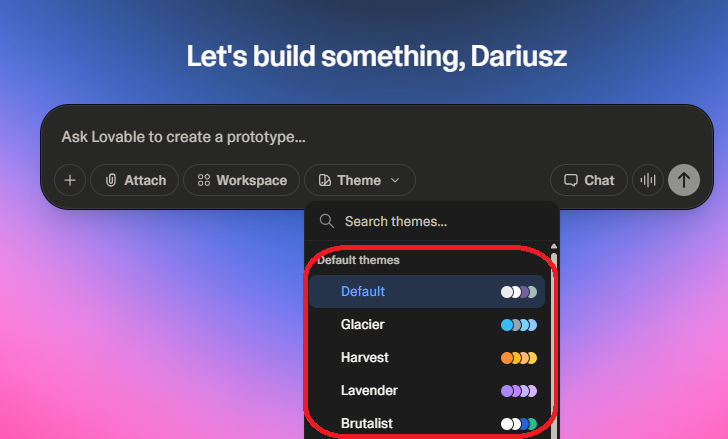
It is possible to use Figma via the Figma to Code plugin (however, I have not tested this personally). For applications where data and/or process are key, the available themes should be sufficient.
What factors suggest Lovable is a good fit for a production application, and what are the contraindications? Here’s a summary.
| Feature | For | Against |
| Size | Small, medium | Large, very large |
| Client | Small, medium, startup | Large company, corporation |
| Risk appetite | High | Low |
| Complexity | Low | High |
| Processes | Simple and short | Complex or long |
| Application area (not client’s!) | Landing pages, portfolios, search/result presentation | Regulated activity: Medicine, banking, government |
| Stored data | Little, flat, public | Personal, biometric, secret, secure, complex, multi-nested, strongly relational |
| Integrations | API, stateless, standard REST/GraphQL | Files, bus, Kafka, legacy SOAP, hardware layer / binary protocols |
| SLA | 99% | 99.9% + |
In summary, Lovable can write an application very quickly and efficiently. Unfortunately, at this point, it is not able to correctly handle high complexity in any area.
Simple things it will do quickly, efficiently, and well – but it is best not to vibe-code truly complex processes or algorithms in Lovable.
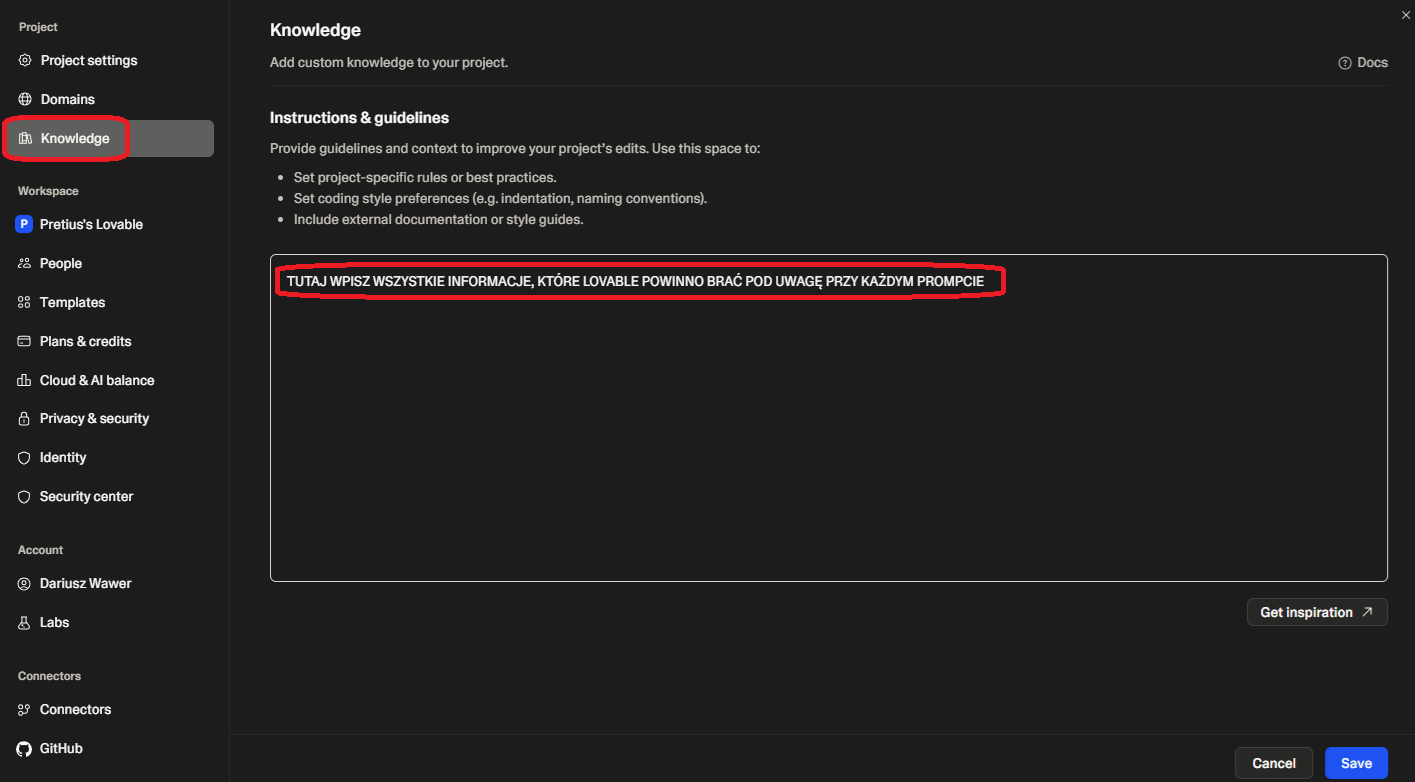
Go to the project settings (<Ctrl>-<dot>), select Knowledge and enter key information from the basic prompt, guidelines on code creation, UX strategy, security, etc.
A sample Knowledge prompt is in the addendum at the end of the article.
You are the architect, UX designer, tester, and user. Treat Lovable as the developer.
When working on an advanced application in Lovable, remember that at some point, a “cut-off point” will occur-the moment when there will be more manual work on the code than vibe coding. It is quite difficult to identify that moment and it takes some experience to do it well. It’s a frequent pitfall to keep vibe-coding, even though a manual fix would be faster.
Still, the old rule should still apply: Always code as if the guy who ends up maintaining your code will be a violent psychopath who knows where you live.
Why should we switch from vibe coding to traditional development in a project?
At the moment (last updated: April, 2026), tools like Lovable are not effective in maintaining and developing large and complicated applications. The changes they generate introduce a large number of regression errors and architecture violations, and do not take into account edge cases or handle them poorly.
If you spend more time manually correcting code generated by an AI tool, the cut-off point has probably arrived. This does not mean, of course, that no changes can be made by AI anymore. Some can. But some are not worth it.
Unless you give clear instructions, AI tends to code like a junior/early mid programmer, line by line, if after if, case after case. The code’s usually good at the method level, but often lacks proper abstractions, or does not leverage common patterns. The number of methods, the level of generalization, the solution’s abstraction, and the overall “cleanliness” are relatively low for large, AI-generated applications. Therefore, it is important to work iteratively, review the code, and ensure its structure is sound. It is also worth paying attention to edge cases and error handling.
AI will perform the work you specify reasonably well. It will do what you tell it to do. However, if you don’t describe precisely what it should do, it most likely won’t do it the way you would like.
What works well:
What does not necessarily work well:
In my opinion, the more the defined operation resembles a find-and-replace based on a regex, the greater the chance that it will be performed as intended. Prompts like “change the remaining methods as I changed the first one to comply with its convention” work surprisingly well. Of course, the more precise the prompt, the better the result will be.
Note: if you need to do a lot of refactorings, you are most likely approaching the cut-off point. Perhaps it is time to return to classic coding.
AI handles the task of generating unit tests for existing methods very well. If you have code with clean, atomic, well-structured methods, AI will be able to prepare a complete set of tests.
Include in the prompt:
After the initial prompt, review the code for edge cases and others not included in the generated tests. Remember to add tests as you code further functionalities.
I recommend vibe coding the remaining types of tests one by one. So far, I have not been able to automatically prepare good integration tests on a massive scale.
During the pre-production stage, commission a pentest of your application. It should be reliable and comprehensive. Ideally, it should be performed by an external company or at least a different team, so there’s no pressure to greenlight the application.
Use the best available model.
# Role: Lead Solutions Architect
# Task: Create a “First-Move” Initial Prompt for Lovable.dev
I am providing you with my project specification documents (Functional/Non-functional requirements, Use Cases, and API definitions). Your goal is to synthesize these documents into a single, high-density “Initial Prompt” that I will use to start a new project in Lovable.dev. Follow the official Lovable Prompting Handbook structure.
### Instructions for Extraction:
1. **Application Type:** Define exactly what this is (e.g. “A multi-tenant SaaS for HIPAA-compliant patient management”).
2. **Core modules:** Define shared, core modules that will be used accross the application (e.g. “User management with assinables roles and permissions”, “Message bus IO service”)
3. **Core Database Schema:** Define the 4-6 most critical tables, their primary keys, and relationships. Focus on core modules data model.
4. **Primary vs. Secondary Features:** Group features so the AI understands the first application draft vs. the roadmap.
5. **The “First Step”:** Describe the specific layout and components of the INITIAL landing page or dashboard that should be generated first.
### Required Output Format: Generate a single Markdown block that begins with: “I need a [Application Type] with:” and follows this template:
1. **Core Modules:** [Detailed list]
2. **Core Functionality:** [Bulleted list of main features grouped by module]
3. **Database & Auth:** [Brief description of tables and Supabase integration]
4. **The First Step:** “Start by building the [Page Name] containing: [Specific UI components and layout instructions].”
<result of the prompt above>
5. **Other key points**:
* **Three-State Logic:** Every protected component must explicitly handle three states: `Loading`, `Authorized`, and `Unauthorized`.
* **Standardized Feedback:**
* Use **Skeleton loaders** (from `@/components/ui/skeleton`) for all pending async states.
* Use a standardized `AccessDenied` component for failed authorization.
* **Strict Typing:** Use TypeScript interfaces/types for all data structures. The `any` type is **strictly prohibited**.
* **Error Handling:** Wrap all async operations in `try/catch` blocks. Provide user-friendly error messages that **do not** expose stack traces or sensitive system data.
# System Directive: Development & Security Protocol
## 1. Security & Data Integrity (Highest Priority)
* **Zero-Trust Access:** Every data operation must undergo security verification. All SQL operations (SELECT, INSERT, UPDATE, DELETE, RPC) must be explicitly authorized.
* **Input Validation:** Use **Zod schema validation** for all incoming data before it reaches the database or is sent to external APIs.
* **Database Protection:**
* Enforce **Row Level Security (RLS)** policies on every table.
* **NEVER** bypass RLS via service roles or API overrides.
* All queries must use parameterized inputs or official client SDK methods to prevent SQL Injection.
* **Secrets Management:**
* **NEVER** store credentials, keys, or passwords in the codebase, comments, or logs.
* **NEVER** expose sensitive authentication metadata via API responses.
* All authentication information must be stored securely as environment secrets.
## 2. Component State & UX Patterns
* **Three-State Logic:** Every protected component must explicitly handle three states: `Loading`, `Authorized`, and `Unauthorized`.
* **Standardized Feedback:**
* Use **Skeleton loaders** (from `@/components/ui/skeleton`) for all pending async states.
* Use a standardized `AccessDenied` component for failed authorization.
## 3. Architecture & Technical Excellence
* **Strict Typing:** Use TypeScript interfaces/types for all data structures. The `any` type is **strictly prohibited**.
* **DRY & Reuse:**
* Actively detect and reuse existing components if the needed changes are reasonable.
* **Pre-action Requirement:** Before creating a new component or utility, search `@/components/ui` and `@/lib`. In your thought process, list existing components that could be reused or extended.
* **Error Handling:** Wrap all async operations in `try/catch` blocks. Provide user-friendly error messages that **do not** expose stack traces or sensitive system data.
## 4. Documentation & Traceability
* **Logic Tagging:** Use the following annotations in comments:
* `// @business-logic`: For cost calculations, permission logic, or sensitive data handling.
* `// @complexity-explanation`: For non-trivial algorithms or complex state logic.
* **Requirement Mapping:** When implementing features, reference the source document.
* **Format:** `// Reference: [Document Name] – Requirement [Chapter/Section Number] – [Feature Name]`
After completing the knowledge base, enter the prompt: “The instructions and knowledge base for the project have been updated. Rework the project and make sure the architecture, code and UI adhere to all the requirements“.
Lovable is a powerful tool for rapid application developm0ent. It works best for small and medium projects with low complexity and simple business processes. React, TypeScript, Supabase out of the box – which is a solid, modern stack to start with.
As developers, we can use it to vibe code the first functionalities quickly. A demo, a concept of a process used to take days to prepare, now it takes hours. The productivity and agility boost is real.
That said, the limitations are equally real. Lovable sometimes codes along the path of least resistance, which in turn means low abstraction, repetitive patterns, and code that needs significant refactoring. The more complex the project, the more precise your prompts need to be.
Remember the cut-off point. When you spend more time fixing regression errors and architectural violations than you save by vibe coding, it is time to switch back to traditional development.
Finally, if there’s one point you should take out of this article, it’s that Lovable does not handle security for you. Do manual RLS verification, explicit secret management, and a proper pentest before production. Your application and your customer’s data are your responsibility, not the platform’s.